Nanoleaf Shapes Hexagons Review: Smart Light Panels Worth It?
Do you want a wall that glows, moves, and reacts to your music? Nanoleaf Shapes Hexagons can do exactly that. These smart light panels turn a plain wall into a live piece of art.
I spent time with the panels and looked closely at the setup, the app, the light quality, and the price. This review covers everything you need to know before you buy. By the end, you will know if Hexagons fit your room, your style, and your budget.
In a Nutshell
Here is a quick summary for busy readers. These points show the most important things about the Nanoleaf Shapes Hexagons.
- Stunning Visual Design: Each hexagon panel measures about 8 inches from side to side and only 0.24 inches thick. The panels sit flat on the wall and look modern in any room. You can build almost any layout you can imagine.
- Easy Installation: Snap on mounting plates and secure locking links make setup simple. Most people finish a 7 panel layout in under an hour. No drilling is needed on most painted walls.
- Smart Features Galore: The panels respond to touch, sync with music through a built in microphone, and mirror your computer screen. Touch actions can even control other smart devices in your home.
- Wide Compatibility: Hexagons work with Amazon Alexa, Google Assistant, and Apple HomeKit. They also support IFTTT and SmartThings, and they connect over 2.4GHz WiFi without a hub.
- Premium Price Tag: A 7 panel starter kit costs around $200, and a 3 panel expansion pack costs about $60. The price is high, but the quality and features match it.
- Best Use Case: These panels work best as mood lighting and wall decor. They are not a replacement for your main room lights.
Nanoleaf Shapes Hexagons Smarter Kit Overview

- [Build & Expand Your Designs] Create beautiful symmetry in any room, or get completely abstract - the...
- [Color-Changing Animations] Customize your lights with colors and motions; transition colors slowly for...
- [16M+ RGBW Colors] Virtually limitless color options. Select from or create your own color-changing...
Last update on 2026-11-02 / Affiliate links / Images from Amazon Product Advertising API
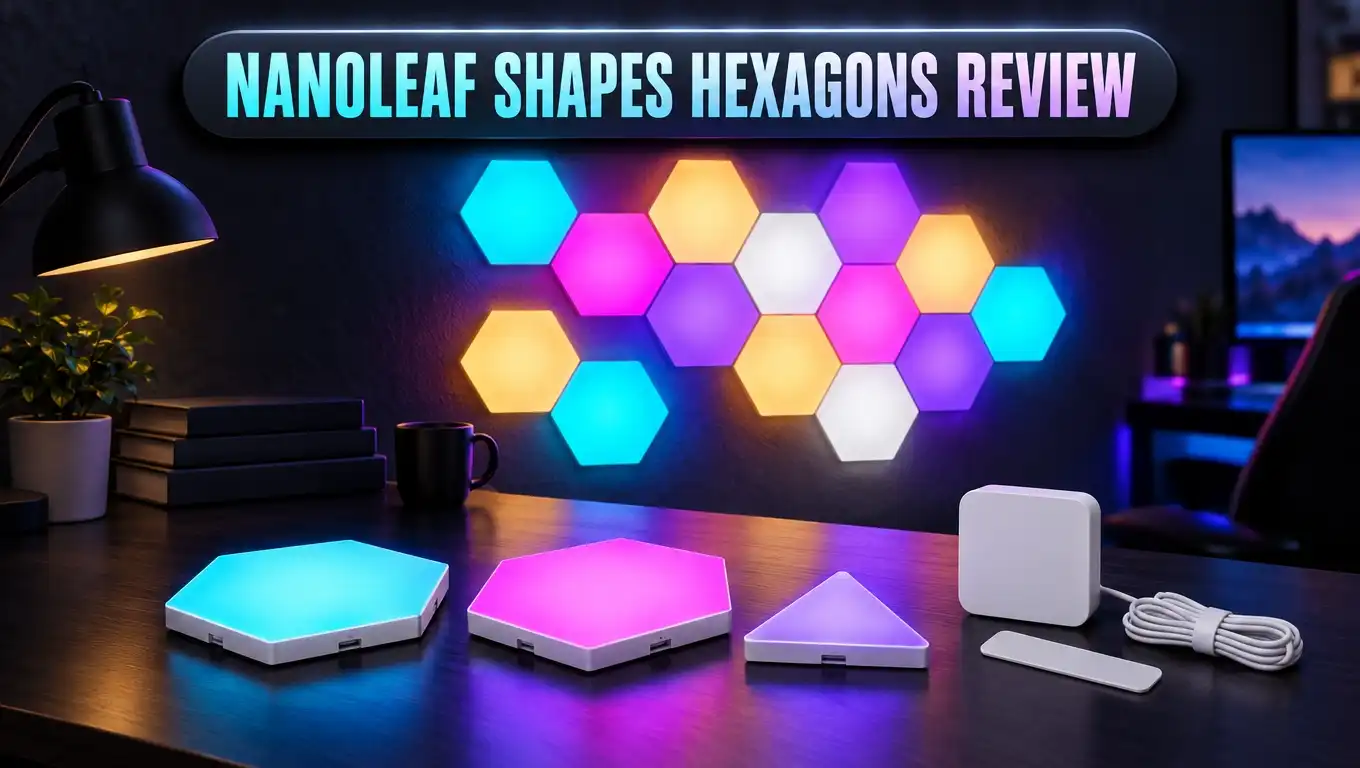
Nanoleaf Shapes Hexagons are modular smart light panels. You connect them to build a glowing design on your wall. Each panel holds its own LEDs and can show a different color.
Hexagons were the first product in the Nanoleaf Shapes series. This series replaced the older triangle Light Panels (once called Aurora) and the Canvas squares. Nanoleaf fixed many problems from those older products here.
The biggest change is cross compatibility. Hexagons connect with other Shapes panels, like Triangles and Mini Triangles. This means you can mix shapes in one big design. The older Light Panels and Canvas squares never offered that freedom.
Each panel puts out about 100 lumens at full brightness. The color temperature goes from a warm 1,200K to a cool 6,500K. You also get more than 16 million colors to choose from.
The panels last up to 25,000 hours, according to Nanoleaf. They are made for indoor use only. A single power supply can run up to 21 panels, so you can grow your layout before you need a second plug.
Hexagons connect straight to your home WiFi. You do not need a separate hub or bridge. That saves money and keeps setup simple. Shapes controllers also support Thread, which helps with faster and more reliable smart home control.
In short, the Hexagons are a decor light first. They make a room feel alive. If you love a bold, modern look, this product deserves your attention.
What Comes in the Box
The starter kit, often called the Smarter Kit, gives you everything you need to begin. You do not need to buy anything else to start. That is a nice touch for a premium product.
The 7 panel starter kit includes these items:
- Seven Hexagon light panels with mounting plates already snapped into place.
- A snap on controller with touch buttons for power, brightness, and scenes.
- A power supply with a cord that clips onto a connector module.
- Linkers to join each panel to the next one.
- Adhesive mounting tape for each plate.
- A quick start guide with a QR code for pairing.
Some retailers also sell 9 panel and 10 panel kits. More panels give you more design freedom from day one. If you want a large wall display, a bigger kit often saves money compared with buying expansions later.
Expansion packs come with three panels plus mounting parts. They do not include a controller or power supply. You need a starter kit first, then you add expansions as you go.
One thing is missing from the box: screws. The mounting plates come with predrilled holes, though. If you have a brick wall or wallpaper, Nanoleaf suggests you use screws. You will need to buy small screws at a hardware store for those walls.
The packaging feels premium and well organized. Each part sits in its own spot, so you can find things fast. This makes the unboxing feel exciting instead of messy.
Design and Build Quality
The Hexagons look sleek and minimal when they are off. When they light up, they become the main focus of the room. That double life is a big part of their charm.
Each panel measures about 8 inches from flat side to flat side. It measures about 9 inches from corner to corner. The panel is just 0.24 inches thick, so it sits close to the wall.
Each panel weighs around 208 grams, which is a little under half a pound. The panels feel light but strong in your hand. The plastic diffuser feels solid and does not bend easily.
The new linkers are a big upgrade. Older Nanoleaf panels used slide in connectors that often came loose. The Shapes linkers snap and lock firmly into place. Your design stays connected and works reliably.
The detachable mounting plates are another smart change. You stick the plate to the wall, not the panel itself. This makes it easier to remove or move a panel later.
Light coverage is good but not perfect. The very tips of each hexagon do not light up fully. You may also see faint shadows near the edges up close.
Most people will not notice these small flaws from across the room. From a normal viewing distance, the glow looks smooth and rich. Only very picky users will find it annoying.
The power plug is the one design weak spot. It uses a chunky rectangular adapter. This adapter can block the second outlet on a standard wall socket. Plan your power source before you install.
Top 3 Alternative for Nanoleaf Shapes Hexagons
The Hexagons are great, but they are not the only option. Some shoppers want a lower price or a different look. Here are three strong alternatives worth a look.
Govee Glide Hexa Pro Light Panels

- Innovative 3D Light Panels: H6066, an upgrade from H6061, is changing the lighting game by taking your...
- Expressive Scenes: Find the lighting that expresses your mood or celebrates your favorite holidays such...
- Customize Your Home Aesthetics: Our light panels are designed for those who think outside the box with...
Last update on 2026-11-02 / Affiliate links / Images from Amazon Product Advertising API
The Govee Glide Hexa Pro offers a 3D hexagon design. Each panel has a raised, layered look that adds depth to your wall. It often costs less than a Nanoleaf kit of similar size.
It uses RGBIC technology, so one panel can show several colors at once. It also works with Alexa and Google Assistant. It lacks HomeKit support and touch controls, though.
Nanoleaf Lines Smarter Kit

- [Build & Expand Your Designs] Design your own unique layouts for a stunning and futuristic ambient glow...
- [Color-Changing Animations] Customize your lights with colors and motions; transition colors slowly for...
- [16M+ RGBW Colors] Virtually limitless color options. Select from or create your own color-changing...
Last update on 2026-11-02 / Affiliate links / Images from Amazon Product Advertising API
Nanoleaf Lines use glowing light bars instead of flat panels. The bars sit off the wall and cast a soft backlight glow. This creates a more futuristic and gaming style look.
Lines use the same Nanoleaf app and smart home support. Each bar has two color zones, so you get rich effects. It is a great pick if you prefer lines to solid shapes.
Govee Glide Hexagon Light Panels Ultra

- Innovative 3D Light Panels: H606A, an upgrade from H6061, changes your game room by taking your wall...
- Multifaceted Ultra Lighting: The panels are equipped with 129 LED beads. The flagship product, with...
- Open Patching: The six sides of the upgraded hexagon light panel can be spliced. Offering virtually...
Last update on 2026-11-02 / Affiliate links / Images from Amazon Product Advertising API
The Govee Glide Hexagon Ultra is a newer 3D panel option. It packs many lamp beads and comes with 60 preset scenes. It aims at gamers who want bold effects at a lower cost.
It works with popular voice assistants and supports DIY designs. Govee products usually cost less than Nanoleaf, but the app and build feel a bit less premium.
Installation and Setup
Many people fear wall installs. The good news is that Hexagons are surprisingly easy to set up. The hardest part is picking your design.
Start by planning your layout. The Nanoleaf app has a Layout Assistant feature. It uses augmented reality to show your design on your real wall. This helps you avoid mistakes before you stick anything down.
Next, clean the wall area well. Dust and grease weaken the adhesive tape. A quick wipe with rubbing alcohol works well.
Now follow these simple steps:
- Peel and stick the adhesive tape onto the back of a mounting plate.
- Snap linkers into the sides that connect to other panels.
- Press the panel firmly on the wall for about 30 seconds.
- Repeat for every panel, connecting each new one as you go.
- Snap on the controller and the power connector at the edges.
A 7 panel layout takes about 30 to 60 minutes. Larger layouts take longer, of course.
The adhesive holds very well. Panels stay firm for weeks and months. Removing a panel takes some effort because the tape grips hard. The plates usually come off without damage if you pull slowly.
Pairing is quick. Open the Nanoleaf app, tap to add a device, and scan the QR code. The code sits in the quick start guide and on the power plug. Within a few minutes, your panels join your WiFi network.
Nanoleaf App and Scenes
The Nanoleaf app is where the magic happens. It works on iOS and Android, and there is a desktop app too. The app lets you control every panel and build your own effects.
Scenes are animated light shows. They go far beyond basic “morning” or “relax” presets. Colors ripple, fade, flow, and pulse across your panels.
The app comes with many preloaded scenes. You can also browse thousands more made by the Nanoleaf community. Some popular ones have fun names like “Vibrant Sunrise” and “Netflix and Chill.”
You can also make your own scenes. Pick colors, choose a motion style, and set the speed. Creating a custom scene feels fun, not technical. Even beginners can design something beautiful in minutes.
Scheduling is simple. You can set daily and weekly schedules to turn scenes on and off. Playlists let your panels cycle through several scenes automatically.
The app does have a few gaps. Some users wish for more advanced scheduling options inside the app. You can fill these gaps with Alexa, Google, or HomeKit routines, which add sunrise and sunset triggers.
App performance has improved over the years. Early versions felt slow and buggy at times. Recent updates have made the app smoother and more stable, though connection drops still happen for some users.
Overall, the app gives you deep control. You can keep things simple or go wild with custom designs.
Touch Controls and Interactive Features
Touch control is one of the coolest Hexagon features. Every panel reacts to your fingers. This turns your wall into an interactive surface.
You can set up simple gestures. A double tap can turn the panels on or off. A swipe up or down can change brightness. A swipe across can switch to the next scene.
Touch actions go even further. You can link a tap, double tap, or long press to other smart devices. For example, one tap could turn on your Hexagons and close your HomeKit blinds. This makes the panels a real smart home control center.
Interactive scenes add a playful side. “Touch Paint” lets you paint colors on the panels with your fingertips. Kids and guests love this feature.
There are even simple games built in. You can play “Whack a Mole” and “Simon” right on your wall. These games are a fun surprise at parties.
The snap on controller also offers physical buttons. It controls power, brightness, and scene changes. This helps when your phone is not nearby.
Touch features do have limits. You need to place the panels within easy reach to use them. High mounted designs make touch controls less practical. Think about how you will use touch before you choose a spot.
Overall, touch control makes the Hexagons feel special. It is a key reason to pick Nanoleaf over cheaper brands.
Music Sync and Screen Mirror
Music sync makes the Hexagons come alive at parties. A built in microphone listens to your music and syncs the lights to the beat. You do not need any extra hardware.
Rhythm scenes pulse, flash, and shift with your songs. Fast tracks create energetic bursts of color. Slow songs bring soft, flowing changes.
The sync works well with most music styles. It reacts quickly to strong beats and bass. Quiet or complex music can feel a little less responsive.
Placement matters for good results. Put your speaker within a reasonable range of the controller. The microphone needs to hear the music clearly.
Screen Mirror is a great feature for gamers and movie fans. It works through the Nanoleaf desktop app. The panels copy the colors on your computer screen in real time.
During games, the wall glows with explosions and scenery. This creates an immersive, theater style experience. Movies also look more dramatic with matching colors behind your desk.
There is one small catch. White webpages can make the panels glow very brightly. Turn off Screen Mirror when you browse or work to avoid harsh light.
These two features add a lot of fun. They push the Hexagons beyond simple decor. If you game or host parties often, you will use them a lot.
Smart Home Compatibility
Hexagons play nicely with the major smart home platforms. They work with Amazon Alexa, Google Assistant, and Apple HomeKit. That covers most homes.
Voice control is simple. You can say “Alexa, turn on the Hexagons” or “Hey Google, dim the Hexagons.” You can also ask for a scene by name. Siri works too if you use HomeKit.
HomeKit support is especially strong. You can add the panels to HomeKit scenes and automations. Touch actions can also trigger other HomeKit devices.
The panels also support IFTTT, SmartThings, and Homey. This opens many automation options. For example, the panels can flash when you get a doorbell alert.
Thread support adds extra value. Shapes controllers can act as a Thread border router. This helps other Thread devices in your home connect faster and more reliably.
Nanoleaf has also worked to bring Matter support to its Shapes line. Matter lets smart devices from different brands work together more easily. Check the current firmware and app for the latest Matter details before you buy.
Routines through Alexa or Google add sunrise and sunset scheduling. This fixes a gap in the Nanoleaf app. You can wake up to a warm glow or wind down with soft colors at night.
Overall, smart home support is a major strength. Few decor lights match the Hexagons on platform coverage.
Brightness, Color, and Light Quality
Light quality decides if a smart panel feels premium. The Hexagons deliver bright, rich, and vivid colors. They look great day and night.
Each panel reaches about 100 lumens. A 16 panel setup at full white could light a small room. Still, these panels shine best as accent and mood lighting.
Color range is excellent. You get over 16 million colors to pick from. Reds look deep, blues look bold, and greens look fresh.
White light is flexible too. You can tune from a warm 1,200K glow to a cool 6,500K daylight tone. Warm settings feel cozy in the evening, while cool settings help you focus.
Color mixing between panels looks smooth. Animated scenes blend colors in an eye pleasing way. Transitions feel fluid, not choppy.
Diffusion is good overall. The plastic covers spread light evenly across most of each panel. As noted before, the corners stay a bit darker.
Up close, you may spot faint shadows near the edges. From across the room, these flaws almost disappear. Most owners never think about them.
Brightness control is wide. You can dim the panels very low for a night light. You can also turn them up high for a bold party look.
In short, light quality is a big win. The Hexagons look premium whether they glow softly or burst with color.
Price and Value
Let us talk about money. The Nanoleaf Shapes Hexagons are not cheap. A 7 panel starter kit usually costs around $200.
Expansion packs cost about $60 for three panels. A large wall design can quickly reach $300 to $500 or more. This puts the Hexagons in the premium category.
Sales help a lot. Nanoleaf and major retailers often run discounts, especially around holidays. Waiting for a sale can save you a big chunk of money.
So, what do you get for that price? You get strong build quality and secure linkers. You also get a polished app with a huge scene library.
You also get touch control, music sync, and screen mirroring. Wide smart home support and Thread add even more value. Cheaper rivals rarely match all these features together.
Budget brands like Govee cost less. They offer similar looks and good effects. However, they often skip HomeKit support and touch controls.
Think about how you will use the panels. If you want simple colored lights, a cheaper brand may be enough. If you want a premium, interactive wall feature, Nanoleaf earns its price.
Long lifespan adds to the value. At up to 25,000 hours, the panels can last for many years. Spread over time, the cost feels more reasonable.
Overall, the Hexagons offer good value for the right buyer. They are a splurge, but a satisfying one.
Pros and Cons
Every product has strengths and weaknesses. Here is a clear look at both sides of the Hexagons. This helps you make a smart choice.
Pros
- Easy installation: Snap on plates and locking linkers make setup fast and stress free.
- Beautiful scenes: Animated effects look stunning and the scene library is huge.
- Touch controls: Every panel reacts to taps and swipes, and touch actions control other devices.
- Wide smart home support: Works with Alexa, Google Assistant, HomeKit, IFTTT, and SmartThings.
- Music sync and screen mirror: The built in mic and desktop app add fun party and gaming features.
- Modular design: You can mix Hexagons with other Shapes panels for creative layouts.
- Thread support: The controller boosts your wider smart home network.
Cons
- High price: Starter kits and expansions cost more than most rival brands.
- Tough removal: The strong adhesive makes panels hard to pull off the wall.
- Chunky power adapter: The bulky plug can block a nearby outlet.
- Uneven corners: Panel tips stay dark and faint edge shadows are visible up close.
- No screws included: Brick or wallpaper walls need extra hardware you must buy.
Overall, the pros clearly outweigh the cons for most buyers. The main drawback is price. If your budget allows it, the downsides feel minor in daily use.
Who Should Buy the Nanoleaf Shapes Hexagons
The Hexagons are not for everyone. They suit buyers who value style, fun, and smart features. Here is who will love them most.
Gamers are a perfect match. Screen Mirror syncs the panels with your games. The glow behind your desk makes every session feel more exciting.
Streamers and content creators also benefit. The panels make a striking background on camera. Viewers notice a colorful, glowing wall right away.
Smart home fans will enjoy the deep integrations. HomeKit, Alexa, Google, and Thread support make the panels part of your wider system. Touch actions turn them into a control panel too.
Design lovers will like the creative freedom. You can build almost any shape on your wall. Mixing with other Shapes panels opens even more ideas.
Families with kids will love the touch games and paint features. Kids find the interactive panels magical. Just mount them low enough for small hands.
Some buyers should skip the Hexagons. If you need bright task lighting, choose ceiling lights or smart bulbs instead. These panels are for mood and decor.
Tight budgets are another reason to pass. Cheaper brands offer a similar look for less money. You will lose some features, but you will save a lot.
Renters should think about the adhesive. Removal takes effort, though it usually leaves no damage. Test a small area first if you worry about your walls.
Final Verdict
The Nanoleaf Shapes Hexagons are among the best smart light panels you can buy. They mix beautiful design, smart features, and easy setup into one package. Few rivals feel this polished.
Installation is simple thanks to snap on plates and locking linkers. The app offers endless scenes and custom design tools. Touch controls and music sync add real fun to daily life.
Smart home support is excellent. Alexa, Google Assistant, and HomeKit all work smoothly. Thread support and integrations like IFTTT push the value even higher.
The panels are not flawless. They cost a lot, and the power adapter feels bulky. The panel corners also stay a bit dark up close.
Still, these flaws feel small next to the overall experience. Once the Hexagons glow on your wall, it is hard to imagine your room without them. They change the mood of a space instantly.
If you want a premium, interactive wall feature, the Hexagons are easy to recommend. Wait for a sale if you can, and start with a starter kit. You can always add more panels later as your design grows.
My rating: 4.5 out of 5 stars. The Nanoleaf Shapes Hexagons earn a strong place in any modern smart home.
Frequently Asked Questions
Do Nanoleaf Shapes Hexagons need a hub?
No, they do not need a hub. The panels connect directly to your 2.4GHz WiFi network. The controller also supports Thread for extra smart home benefits.
Can I mix Hexagons with other Nanoleaf panels?
Yes, you can mix Hexagons with other Shapes panels like Triangles and Mini Triangles. However, they do not connect with the older Light Panels or Canvas squares.
How many panels can one power supply run?
One power supply can run up to 21 panels. Larger designs need an extra power supply. Plan your layout with this limit in mind.
Will the panels damage my walls?
The panels usually come off without damage on painted walls. The adhesive grips hard, so remove the tape slowly. Test a small spot first if you rent.
Are Nanoleaf Hexagons bright enough to light a room?
Each panel gives about 100 lumens. A large design can light a small room, but the panels work best as mood and accent lighting.
Do Hexagons work with Apple HomeKit?
Yes, they work with Apple HomeKit. They also support Amazon Alexa, Google Assistant, IFTTT, and SmartThings.
Can the panels sync with music?
Yes, a built in microphone lets the panels sync with music. Rhythm scenes pulse and flow to the beat of any song playing nearby.
How long do Nanoleaf Hexagons last?
Nanoleaf rates the panels for up to 25,000 hours of use. With normal daily use, they can last for many years.

DK is the founder and lead writer at Smart Lighting Finds, where he helps readers discover the best lighting products through honest, hands-on reviews and in-depth comparisons. With a deep passion for home improvement and smart technology, DK is dedicated to making every lighting decision easier and brighter for his readers.