Nanoleaf 4D Screen Mirror Kit Review: Smart TV Backlight Worth It?
Your TV shows a sunset, and the wall behind it glows orange. A spaceship explodes, and your room flashes red and gold. The Nanoleaf 4D Screen Mirror Kit promises exactly this.
Plenty of TV backlights make big claims. Many of them fall flat with dull colors and slow reactions. So does the Nanoleaf 4D deliver, or is it another gimmick?
I looked closely at how it works, how it performs, and what real users say. This review covers setup, color accuracy, gaming, music, privacy, and value. Stick around to find out if this kit belongs behind your TV.
In a Nutshell
- Camera based syncing: The Nanoleaf 4D uses a small camera to read your screen. It needs no HDMI box, so it works with any TV, any streaming app, and any game console.
- Four immersion levels: You choose from 1D, 2D, 3D, or 4D modes. The 1D mode gives a soft white glow. The 4D mode copies the screen colors zone by zone for full immersion.
- Two sizes and many color zones: The kit comes in versions for TVs up to 65 inches and up to 85 inches. The smaller kit has up to 40 color zones. The larger kit has up to 52 zones.
- Easy installation: Most people finish setup in under 30 minutes. The strip is trimmable, and corner pieces help you bend it neatly around the TV.
- Smart home friendly: The kit works with Apple Home, Google Home, Alexa, SmartThings, and Homey. Sync+ also lets you mirror screen colors on over 50 other Nanoleaf lights.
- Great value: The 65 inch kit lists at $99.99 and often drops to $79.99. The 85 inch kit lists at $119.99. That price beats most HDMI sync systems by a wide margin.
Nanoleaf 4D Screen Mirror Kit

- 【TV LED Backlight】Enhance your home theater or gaming setup with this Nanoleaf 4D TV backlight...
- 【Versatile Compatibility】This LED TV backlight is compatible with TVs and monitors up to 85 inches...
- 【Sync+ Light Show】Sync+ is a feature of Nanoleaf TV Backlights that allows you to virtually connect...
Last update on 2026-11-01 / Affiliate links / Images from Amazon Product Advertising API
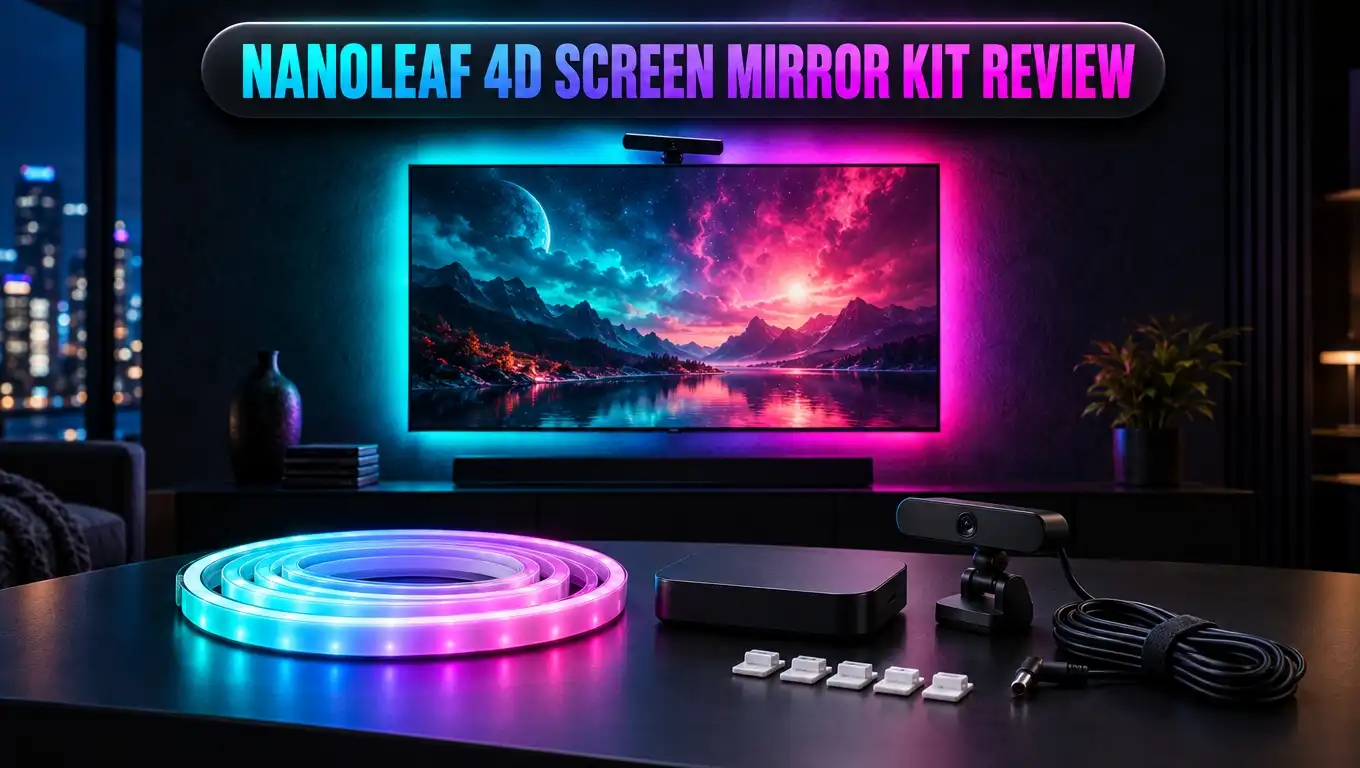
The Nanoleaf 4D Screen Mirror Kit is a TV backlight system. It includes a camera, an addressable LED lightstrip, and a small control box. The camera watches your screen and sends color data to the strip.
The strip sits on the back of your TV. It glows in matching colors as the picture changes. This creates the feeling that your picture spills past the edges of the screen.
Nanoleaf calls this “True Screen Sync.” The idea is simple. Your TV shows a forest, and the wall turns green. Your TV shows a night city, and the wall turns deep blue and purple.
Most cheap TV backlights only show preset effects. They cycle through rainbow colors or pulse at random. The Nanoleaf 4D reacts to the actual content on your screen, which is a big step up.
The best part is the camera approach. Many premium systems need an HDMI sync box. That box sits between your devices and your TV. It can cause compatibility trouble with 4K, HDR, or high refresh rate gaming.
The Nanoleaf 4D skips all of that. If it plays on your TV, the kit can mirror it. That includes built in smart TV apps, cable boxes, consoles, and even a laptop connected to your screen.
Nanoleaf also released a V2 version for 65 inch screens. It uses a new ultra flexible zigzag lightstrip. This strip makes positioning easier on modern thin TVs. The core camera and modes stay the same.
What Comes in the Box
Opening the box feels well organized. Nanoleaf packs every part you need for a full install. You do not need to buy extra adapters or tools.
Here is what you get inside the standard kit:
- The 4D camera with a flexible mount for placing above or below your TV
- A magnetic privacy cover that snaps over the camera lens
- The addressable lightstrip sized for 65 inch or 85 inch screens
- Four rounded corner pieces that help you bend the strip at TV corners
- A control box that links the camera and the strip
- A power adapter and the cables to connect everything
The lightstrip comes with a sticky tape backing. You peel it off and press the strip onto the back of your TV. The adhesive holds well on most plastic TV backs.
The corner pieces deserve a special mention. They stick to the back of your TV first. Then you guide the strip around them. This prevents sharp bends that can damage the LEDs. Testers strongly recommend using them.
The control box is small and light. It can hide behind your TV or sit on your media stand. The cables are long enough for most setups.
The strip is trimmable. If your TV is smaller than the kit size, you can cut away the extra length. Just make sure you cut from the far end, not the end that connects to power. The lighting effects remap to the new length on their own.
Design and Build Quality
The Nanoleaf 4D looks clean and simple. The camera is small and black. It blends in with most TV setups and does not draw attention.
The camera mount bends and clips easily. You can place it on top of your TV frame or set it below the screen. This flexibility helps if you have a soundbar or wall mount in the way.
The lightstrip feels sturdy for its price. The LEDs sit close together. This gives smooth color blends instead of separate dots of light. Each meter carries about 10 color zones, so the gradient looks natural on the wall.
The V2 zigzag strip is a smart design change. It bends in more directions than a standard strip. This helps you fit it on curved or uneven TV backs.
Nanoleaf rates the lightstrip for about 25,000 hours of use. That works out to many years of regular evening viewing. The kit also carries a 2 year warranty from Nanoleaf.
The control box has a minimal look. It has no screen or flashy lights. It does its job and stays out of sight.
One small downside is cable management. You have three pieces linked by wires. Tidy setups need a few cable clips or ties. Nanoleaf does not include those, so plan to grab some.
Overall, the build quality matches or beats most rivals in this price range. Nothing feels cheap or fragile. The parts look like they belong in a modern living room.
Top 3 Alternative for Nanoleaf 4D Screen Mirror Kit
The Nanoleaf 4D is a strong pick, but it is not the only option. Here are three alternatives that suit different needs and budgets.
Govee Envisual TV LED Backlight T2

- Govee Patented Envisual Technology: Upgraded dual cameras provide more accurate color-matching along the...
- Unlimited TV Content Compatibility: Govee TV LED backlights adjust in real time to TV content playing on...
- DreamView Light Show: The DreamView feature takes the TV LED lights to new heights of personalization...
Last update on 2026-11-01 / Affiliate links / Images from Amazon Product Advertising API
The Govee Envisual T2 is the closest rival. It also uses a camera to read your screen. The big difference is that it uses dual cameras for wider and more accurate capture.
The T2 strip also packs double rows of light beads. This makes the glow bright and rich. It costs more than the Nanoleaf 4D, but serious home theater fans may enjoy the extra punch.
Govee TV Backlight 3 Lite

- Upgraded Govee Envisual Technology: The upgraded chip provides stronger performance with a fish-eye...
- 4-in-1 Lamp Bead: RGBICW TV lights add an extra warm white chip into the color mix, a purer white tone...
- Gravitational Hanging Design for Camera: Simplify installation and adapt for ultra-thin TVs. You can use...
Last update on 2026-11-01 / Affiliate links / Images from Amazon Product Advertising API
The Govee TV Backlight 3 Lite is a great budget choice. It uses a single camera with fisheye correction. This feature fixes the curved distortion that cameras often create at screen edges.
It also adds RGBICW lighting, which gives cleaner whites. It suits buyers who want camera sync without spending much. The app offers many scene modes too.
Philips Hue Play HDMI Sync Box

- WHAT'S IN THE BOX - Includes one Hue Play HDMI Sync Box one power adapter, and one HDMI cable; Perfect...
- REQUIRES A HUE BRIDGE - Unlock the power of Hue and enjoy automations control from anywhere in the world...
- SYNC LIGHTS TO ANY HDMI DEVICE - With four HDMI inputs the Play HDMI Sync Box allows you to connect your...
Last update on 2026-11-01 / Affiliate links / Images from Amazon Product Advertising API
The Philips Hue Play HDMI Sync Box takes a different path. It reads the signal straight from your HDMI devices. This gives very precise color matching with no camera at all.
The catch is cost. You need a Hue Bridge and Hue lights, which add up fast. It also only syncs content that passes through its HDMI ports, so built in TV apps will not work.
Installation and Setup
Setup is one of the best parts of this kit. Most users finish the whole process in about 20 to 30 minutes. You need no tools and no technical skills.
First, you clean the back of your TV. Dust stops the adhesive from sticking well. A dry cloth works fine for this step.
Next, you place the four corner pieces. Then you peel the tape and run the strip around the TV edges. Take your time at the corners for a neat finish.
After that, you mount the camera. You place it above or below the screen so it faces the TV. The camera needs a clear view of the whole picture.
Then you plug the strip and camera into the control box. You connect the box to power. The lights turn on, and you are ready for the app.
The Nanoleaf app guides you step by step. It shows a live preview of what the camera sees. You drag a box shape to match the four corners of your screen.
Next, the app lights up spots on the strip. You confirm where each TV corner sits. This mapping step makes the color zones line up with the picture.
Users on forums share one key tip. Spend a few extra minutes on calibration. Many people who felt let down at first loved the kit after a careful second setup. Correct camera angles make a huge difference.
The Four Immersion Modes Explained
The Nanoleaf 4D gets its name from four immersion levels. Each mode changes how closely the lights follow your screen. You switch between them in the app.
1D Ambient Glow gives a soft white light. It follows the brightness of your screen but not the colors. This mode works well for daily TV and news. It also reduces eye strain in a dark room.
2D mode picks one main color from the screen. The whole strip glows in that single shade. It feels calm and less busy. Some viewers prefer it for long movie nights.
3D mode adds more color variety. The strip shows several colors drawn from different screen areas. It strikes a nice balance between calm and dramatic.
4D mode is the full experience. Each zone copies the colors from the matching edge of the screen. A red car on the left lights up the left side of your wall in red. This mode feels the most immersive.
Testers found 3D and 4D the most vibrant. The 1D and 2D modes feel more one note. Still, those calmer modes have a place during casual viewing.
This choice is a real advantage. Many rival backlights offer only one sync style. With Nanoleaf, you set the mood to match the content. You can go subtle for a drama or wild for an action film.
Color Accuracy and Response Time
Color accuracy decides if a TV backlight feels magical or annoying. The Nanoleaf 4D does very well here for a camera system. Reviewers praise its vibrant and fast color shifts.
The kit uses intelligent color matching. It boosts colors and cleans up whites so the glow looks lively. Bright scenes give bright light, and dark scenes dim the strip.
Response time feels quick in normal viewing. When a scene cuts, the strip follows almost at once. Most people notice no lag during movies or shows.
Camera systems do have limits. Room lighting can affect what the camera sees. A bright lamp near the TV may wash out the colors. Reflections on glossy screens can also confuse the camera.
HDR content can look a little different too. The camera sees the light your TV gives off. Very bright HDR highlights may push the colors toward white.
Fast games show a slight delay for some sharp eyed players. The delay is small but real. HDMI sync boxes still win in pure precision.
That said, the Nanoleaf 4D beats most camera rivals at its price. Owners say the colors feel more vibrant and change faster than older kits. For movie fans and casual gamers, the accuracy is more than good enough.
The calibration step matters most here. A well placed camera gives sharp results. A badly angled camera gives muddy colors.
Gaming and Movie Performance
Movies are where the Nanoleaf 4D truly shines. Dark sci fi films feel deeper. Nature documentaries feel brighter and more alive.
The glow extends the picture past the frame. Your eyes perceive a bigger, more cinematic screen. Horror movies get extra tension as red flashes fill the room.
The 1D mode also helps with comfort. Bias lighting behind a TV lowers eye strain. It also makes black levels look deeper because your eyes adjust to the soft light.
Gaming is a lot of fun too. Racing games light the room with streaking colors. Explosions in shooters flash across the walls. Open world games paint your room with skies and forests.
The camera approach is great for gamers. You do not need to route your console through another box. Your PS5 or Xbox keeps full 4K and 120Hz output because nothing sits in the signal path.
Sports viewers enjoy the kit as well. A football match fills the room with green. Team colors pop during big plays.
The small delay matters little for most players. Competitive esports fans may notice it during very fast action. Casual and story driven gamers will love it.
With Sync+, you can also link other Nanoleaf panels. Your wall lights and bulbs can join the show. This turns a single TV setup into a full room light experience.
Music Mode and Rhythm Features
The Nanoleaf 4D is not only for screens. It also works as a music visualizer. Nanoleaf calls this feature Rhythm.
You turn on Rhythm with one tap in the app. The lights then react to sound in the room. Beats make the strip pulse and shift colors.
You can mix Rhythm with any immersion level. This blends screen colors with sound reactions. Music videos look especially fun in this mode.
Party hosts will love this feature. The kit turns your living room into a mini concert space. Karaoke nights get a real stage feel.
The music mode works with any audio source. It reads sound from the room, not from a cable. Your speakers, soundbar, or phone can all trigger it.
Nanoleaf also offers more than 16 million colors. You can pick Scenes, both static and moving, when you are not watching anything. The strip can act as a regular mood light for reading or relaxing.
Some users mention that Rhythm works best at medium to loud volume. Very quiet music may not trigger strong effects. Placement of the control box can also change the response.
Overall, the music features add good value. You get a TV backlight and a party light in one kit. This makes the Nanoleaf 4D useful even when the TV is off.
App and Smart Home Control
The Nanoleaf app controls every feature of the kit. You can turn the camera on or off, change brightness, and switch modes. You can also group lights by room.
The app supports schedules and automations. Your lights can turn on at sunset or dim at bedtime. You can also build custom Scenes with your favorite colors.
Smart home support is wide. The kit works with Apple Home, Google Home, Amazon Alexa, SmartThings, and Homey. You can use voice commands to turn lights on or change colors.
There is one limit to know. Voice assistants and smart home apps control only the basic lighting features. Screen mirroring needs the Nanoleaf app. You cannot start 4D mode with a voice command through every platform.
Sync+ is a standout feature. It links the 4D kit with more than 50 Nanoleaf RGB devices. Shapes panels, Lines, Elements, and Essentials bulbs can all mirror your screen.
The app experience gets mixed reviews over time. Some users report connection hiccups or slow updates. Nanoleaf pushes regular firmware updates that fix many issues.
The kit connects over 2.4GHz WiFi. Most home routers support this band. A strong WiFi signal near your TV helps keep things smooth.
Overall, the app gives deep control. It may take a few minutes to learn. Once set up, daily use feels simple.
Privacy and the Camera
A camera pointing at your living room can feel uneasy. Nanoleaf understands this worry. It built a few features to put your mind at ease.
First, the camera points at your TV, not at you. It sits close to the screen and faces it directly. Its job is to read colors, not to watch the room.
Second, the setup screen shows exactly what the camera sees. You can check the view yourself. This transparency builds real trust.
Third, the kit includes a magnetic privacy cover. It snaps over the lens when you do not use screen mirroring. This physically blocks the camera.
You can also turn the camera off in the app. When you use regular Scenes or Rhythm mode, the camera is not needed.
Of course, any connected device carries some risk. Keep the app and firmware up to date. Use a secure WiFi password for your home network.
Compared to HDMI sync boxes, the camera is the main tradeoff. HDMI boxes need no camera at all. But they cost far more and limit your sources.
For most households, Nanoleaf’s privacy steps are enough. The physical cover is the strongest reassurance because it cannot be bypassed by software.
Price and Value
Price is a big reason to love this kit. The Nanoleaf 4D 65 inch kit lists at $99.99. It often sells for around $79.99 during sales.
The 85 inch kit lists at $119.99. That is still very fair for such a large screen. You get a complete screen sync system for under $125.
Compare this to the Philips Hue route. You need a Hue Bridge, an HDMI Sync Box, and Hue gradient lights. That combo can easily cost several hundred dollars.
Govee kits sit in a similar range. The T2 with dual cameras costs more than the Nanoleaf. The Backlight 3 Lite often costs about the same or a bit less.
The Nanoleaf 4D stands out with its four immersion modes. Few rivals offer that much control at this price. Sync+ with other Nanoleaf lights adds more long term value.
You also get a 2 year warranty. Nanoleaf offers 30 day returns on its own store. Amazon also offers its own return policy.
Reviewers agree the kit is well priced. You get strong color, easy setup, and wide compatibility. For most buyers, the value is hard to beat.
If you already own Nanoleaf panels, the deal gets even sweeter. Your whole room can react to your screen for the price of one kit.
Pros and Cons
Every product has strengths and weak spots. Here is a clear look at both sides of the Nanoleaf 4D Screen Mirror Kit.
Pros
- Works with any source. The camera reads your screen directly, so smart TV apps, consoles, and cable boxes all work.
- No HDMI passthrough needed. Your games keep full 4K and high refresh rates with no signal changes.
- Four immersion modes. You can switch from a calm white glow to full screen matching in seconds.
- Quick and simple setup. Most people finish in under 30 minutes with no tools.
- Great price. The kit costs far less than HDMI based sync systems.
- Strong smart home support. It works with Apple Home, Google Home, Alexa, SmartThings, and Homey.
- Sync+ room effects. Over 50 Nanoleaf devices can join the screen mirror show.
- Privacy cover included. A magnetic cover blocks the lens when you do not need it.
Cons
- Room light affects accuracy. Bright lamps or glare on the screen can wash out colors.
- Calibration matters a lot. A poor camera angle leads to muddy or wrong colors.
- Slight delay in fast games. Competitive players may notice a small lag.
- Voice control is limited. Screen mirroring only starts from the Nanoleaf app.
- Extra camera on display. Some people dislike a camera sitting near the TV.
- App can be glitchy. Some users report occasional connection drops.
Who Should Buy the Nanoleaf 4D
The Nanoleaf 4D suits many types of viewers. But it shines brightest for certain people. Here is who will love it most.
Movie lovers are the top fit. The glow adds depth to every scene. Dark films and colorful animations look especially stunning.
Casual and story gamers will enjoy it too. Open world and racing games feel more alive. The no HDMI design keeps your console at full power.
Smart TV app users benefit greatly. Many HDMI sync boxes cannot read built in apps like Netflix on the TV itself. The Nanoleaf camera reads everything.
Existing Nanoleaf owners get extra value. Sync+ brings your panels and bulbs into the action. This creates a full room effect.
Budget minded buyers get premium features at a fair price. You avoid the high costs of HDMI systems.
Some people should look elsewhere. Competitive esports players may want an HDMI system for lower lag. People who strongly dislike cameras may prefer the Philips Hue route.
Very bright rooms can also be tricky. If your TV room gets heavy sunlight, the camera may struggle in the daytime. The effect looks best in dim or dark rooms anyway.
Overall, most households will find the Nanoleaf 4D a joy to use. It fits families, movie fans, and gamers alike.
Final Verdict
The Nanoleaf 4D Screen Mirror Kit delivers on its main promise. It extends your TV colors into your room in a way that feels natural and fun.
The camera design is its biggest strength. It works with every source and every app without touching your HDMI chain. This saves money and avoids compatibility trouble.
The four immersion modes give real flexibility. You can keep things calm with 1D or go all out with 4D. Few rivals offer this level of choice.
Setup is quick and friendly. The app guides you through every step. A careful calibration pays off with sharp, vibrant results.
The kit is not perfect. Room light can affect colors. Fast games may show a tiny delay. Voice control does not cover screen mirroring.
Still, these flaws are minor for most people. The price makes up for them easily. You get a premium experience for well under the cost of HDMI systems.
My rating: 4.5 out of 5 stars. The Nanoleaf 4D is one of the best camera based TV backlights you can buy today. If you want more immersive movie nights and gaming sessions, this kit is an easy recommendation.
FAQs
Does the Nanoleaf 4D work with any TV?
Yes. The camera reads the picture from your screen, so it works with nearly any TV or monitor. Nanoleaf sells kits for screens up to 65 inches and up to 85 inches.
Do I need an HDMI sync box with the Nanoleaf 4D?
No. The kit uses a camera instead of HDMI. Nothing sits between your devices and your TV, so 4K, HDR, and high refresh rates stay untouched.
Can I trim the Nanoleaf 4D lightstrip?
Yes. You can cut the strip to fit a smaller screen. Always cut from the far end, not the power end. The effects remap to the new length on their own.
Is the Nanoleaf 4D camera safe for privacy?
The camera points at your TV, and the app shows exactly what it sees. A magnetic privacy cover blocks the lens when you are not using screen mirroring.
Does the Nanoleaf 4D work with Alexa and Google Home?
Yes. It also works with Apple Home, SmartThings, and Homey. Voice control covers basic lighting, but screen mirroring runs through the Nanoleaf app.
How many color zones does the Nanoleaf 4D have?
The 65 inch kit has up to 40 color zones. The 85 inch kit has up to 52 color zones. The strip carries about 10 zones per meter.
Can the Nanoleaf 4D react to music?
Yes. The Rhythm feature makes the lights react to sound in the room. You can use it alone or mix it with any screen mirroring mode.
What is the difference between the Nanoleaf 4D and the 4D V2?
The V2 kit is for screens up to 65 inches. It uses a new ultra flexible zigzag lightstrip that makes installation easier. The camera and four immersion modes work the same way.

DK is the founder and lead writer at Smart Lighting Finds, where he helps readers discover the best lighting products through honest, hands-on reviews and in-depth comparisons. With a deep passion for home improvement and smart technology, DK is dedicated to making every lighting decision easier and brighter for his readers.