Nanoleaf Elements Wood Look Review: Smart Wall Panels
Most smart lights look like gadgets. They shine bright colors and scream “gaming room.” The Nanoleaf Elements Wood Look Hexagons take a different path.
These panels look like wood art when they are off. When they turn on, they glow in soft, warm whites. So is this calm and stylish light worth the money? Let’s find out in this honest and friendly review.
In a Nutshell
- Wood look design: The Elements panels look like wood wall decor when they are off. They suit living rooms, bedrooms and nurseries much better than bright RGB panels. They blend into your home instead of standing out.
- Soft white light only: The panels shine from 1500K to 4000K, which runs from amber glow to cool white. Each panel gives about 22 lumens. That makes them mood lights, not room lights.
- Easy setup: The kit uses one adhesive mount per panel and simple linkers. You can pull a panel off its mounting plate later. Most people finish a 7 panel layout in under an hour.
- Smart features: You get touch gestures, music sync through a built in microphone, scenes and schedules. The panels work with Apple HomeKit, Alexa, Google Assistant and SmartThings. The controller can also act as a Thread Border Router.
- Price and value: The 7 panel Smarter Kit launched at $299. It now often sells for much less. Expansion packs add 3 panels each.
- Main drawbacks: You get no color options, the brightness is low and the app can be buggy at times. The warmest setting can also look quite orange.
Nanoleaf Elements Wood Look Hexagons Smarter Kit Overview

- [Build & Expand Your Designs] Create beautiful symmetry in any room, or get completely abstract - the...
- [Color-Changing Animations] Customize your lights with colors and motions; transition colors slowly for...
- [16M+ RGBW Colors] Virtually limitless color options. Select from or create your own color-changing...
Last update on 2026-11-01 / Affiliate links / Images from Amazon Product Advertising API
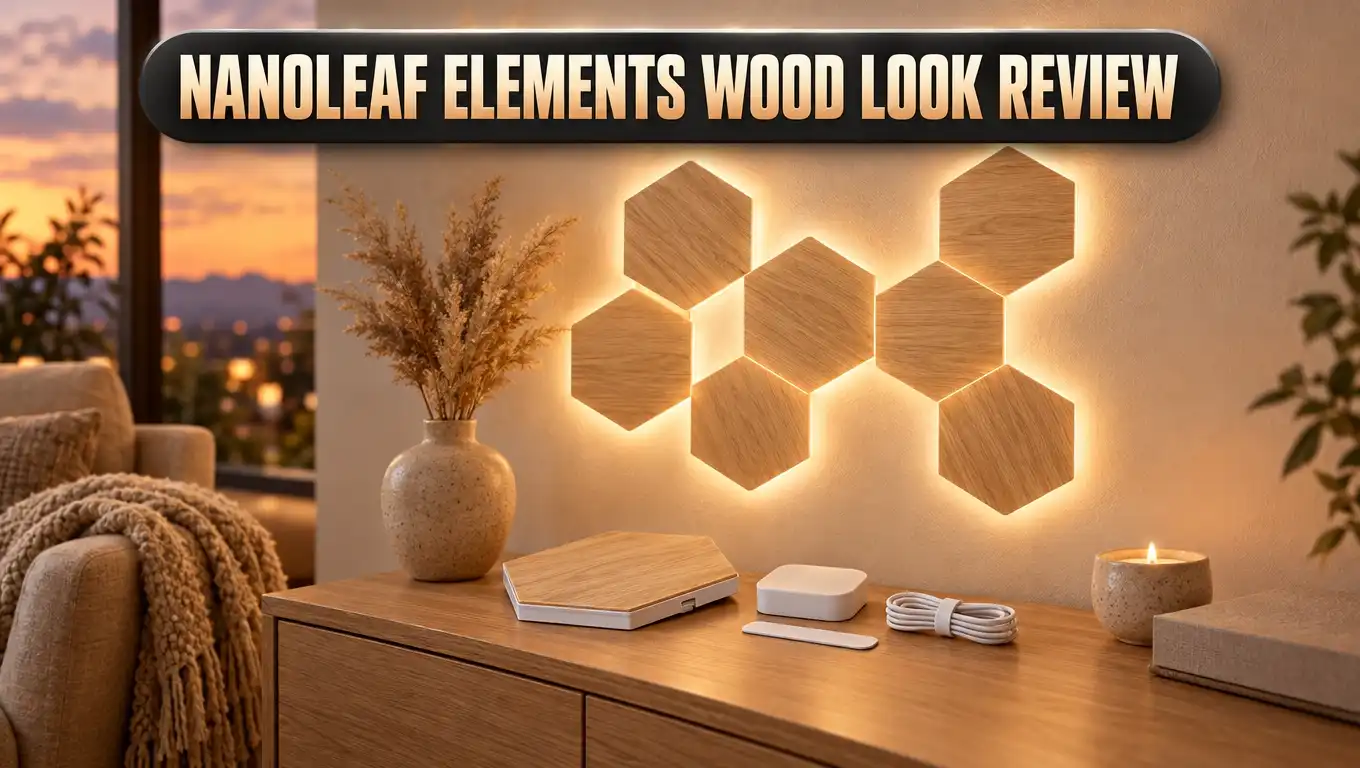
The Nanoleaf Elements line launched as the first wood look smart light panels on the market. Nanoleaf built these panels for people who love smart tech but hate how it looks. They are hexagon panels with a real wood grain finish.
Each panel measures about 9 by 7.75 inches. It sits only about 0.4 inches off the wall once mounted. That slim profile makes the whole design look like a flat wall sculpture.
The big idea here is simple. The panels should look good all day, not just at night. When the lights are off, you see a geometric wood art piece. When they are on, you see a soft, natural glow.
The Smarter Kit is the starter pack. It includes everything you need to build your first design. That means panels, a controller, power supply, linkers and mounting tape.
Nanoleaf also added a feature called corner control. Each corner of every hexagon can glow at a different shade and intensity. This creates a lovely sense of motion that looks like flickering firelight or flowing water.
The Elements do not show colors like red, blue or green. They stick to warm and cool whites. This is a design choice, not a flaw, and it fits the calm, natural theme.
If you want a smart light that feels cozy, Elements is worth a close look. It is one of the few smart home products that really looks like home decor.
Design and Build Quality
The design is the star of this product. The panels have a light wood grain texture that you can see and feel. Run your hand across a panel and you notice the grain lines.
Early reviews described the finish as a laminate with a wood grain, similar to good laminate flooring. Nanoleaf’s current listing describes a real birchwood veneer. Either way, the result looks very natural, even up close.
Each panel has a slightly different grain pattern. This small detail makes the wall look more real. A row of identical prints would look fake, and Nanoleaf avoided that.
The panels feel solid in the hand. Each one weighs about 208 grams. The edges are thin, at about 0.6 cm, and the mounted thickness is about 1 cm.
The controller also has a wood look finish. It blends into the design and does not look like a plastic box. It does not light up, though, so it can look a bit odd next to glowing panels in daylight.
There is one small visual issue. The corners of each panel stay slightly darker when lit. Some people say it looks like a natural wood joint, while others notice it more.
Another point is color choice. You only get one light wood tone. If your room has dark walnut furniture, the panels may not match perfectly.
Overall, the build quality feels premium. Elements looks like something from a design store, not an electronics shop. That alone sets it apart from almost every other light panel.
What Comes in the Box and Key Specs
The Smarter Kit gives you a complete starter setup. Here is what you find inside the box:
- 7 wood look hexagon panels that form the base of your design.
- 1 controller with touch buttons for power, brightness, scenes and rhythm mode.
- 1 power supply with a 2.5 meter cable.
- Linkers to connect the panels together.
- Mounting plates and adhesive tape for each panel.
Now let’s look at the key specs. Each panel gives 22 lumens of light. That is much lower than the Nanoleaf Shapes, which give about 100 lumens per panel.
The color temperature runs from 1500K to 4000K. The low end looks like candlelight or a fire. The high end looks like a clean daylight white.
The panels connect over 2.4 GHz WiFi only. They do not work on 5 GHz networks. This matters if your router combines both bands under one name.
The LEDs are rated for about 25,000 hours of life. That gives you many years of nightly use. Nanoleaf also backs the kit with a two year warranty on its own store.
Smart features include music sync, touch gestures, scenes and schedules. The kit works with Apple HomeKit, Amazon Alexa, Google Assistant, IFTTT and SmartThings. It also supports Connect+, so you can mix Elements with compatible Nanoleaf Shapes.
Mounting uses double sided tape on each plate. You can also use screws through two holes in each plate. Screws and anchors are not included in the box.
Top 3 Alternative for Nanoleaf Elements Wood Look

- [Build & Expand Your Designs] Create beautiful symmetry in any room, or get completely abstract - the...
- [Color-Changing Animations] Customize your lights with colors and motions; transition colors slowly for...
- [16M+ RGBW Colors] Virtually limitless color options. Select from or create your own color-changing...
Last update on 2026-11-01 / Affiliate links / Images from Amazon Product Advertising API

- Innovative 3D Light Panels: H6066, an upgrade from H6061, is changing the lighting game by taking your...
- Expressive Scenes: Find the lighting that expresses your mood or celebrates your favorite holidays such...
- Customize Your Home Aesthetics: Our light panels are designed for those who think outside the box with...
Last update on 2026-11-01 / Affiliate links / Images from Amazon Product Advertising API

- [Build & Expand Your Designs] Design your own unique layouts for a stunning and futuristic ambient glow...
- [Color-Changing Animations] Customize your lights with colors and motions; transition colors slowly for...
- [16M+ RGBW Colors] Virtually limitless color options. Select from or create your own color-changing...
Last update on 2026-11-01 / Affiliate links / Images from Amazon Product Advertising API
Elements is unique, but it is not for everyone. If you want color or more brightness, these three options are worth a look.
The first pick is the Nanoleaf Shapes Hexagons Smarter Kit. It uses the same hexagon shape and the same mounting system as Elements. The big difference is full RGB color with millions of shades.
Shapes panels are also much brighter. They give around 100 lumens per panel. They support Connect+, so you can even mix them with Elements on the same wall.
The second pick is the Govee Glide Hexa Pro. These panels have a 3D raised design that catches light in a fun way. They use RGBIC tech, so each panel can show several colors at once.
Govee is often cheaper than Nanoleaf. It is a great value pick for gamers and teens. The look is bold and modern, which is the opposite of the calm Elements style.
The third pick is Nanoleaf Lines. These are glowing light bars instead of panels. You connect them in lines and shapes to build a neon style design.
Lines shine with backlit color and look striking on a gaming wall. They support music sync and screen mirroring with compatible setups. They are a great choice if you want something sleek and techy.
So which should you pick? Choose Shapes for color with the same layout style. Choose Govee for value and 3D flair. Choose Lines for a bold gaming look.
Installation and Setup
Installing Elements is easy and fun. The best first step is to plan your layout on the floor. Lay out the panels, try different shapes and take a photo of your favorite design.
The Nanoleaf app has a Layout Assistant to help you plan. It also offers AR tools to preview the design on your wall. Some users find the AR option a bit hard to locate, though.
Each panel has a single adhesive strip on a removable plastic plate. Peel off the backing and press the panel onto the wall. Then rub in a circle on the center for about 30 seconds.
Next, slide a linker into the slot between two panels. Every edge has a linker slot, so you can connect panels on any side. Make sure each linker clicks in fully, or the panel will not light up.
A smart trick is to power the panels as you build. Each new panel lights up when it connects properly. This lets you spot a loose linker right away.
Pay attention to the wood grain direction. You can rotate panels on their plates to make the grain flow nicely. This small step makes the final design look far more natural.
The power supply and controller are separate parts. You can place the controller where your hand reaches it easily. The power cable can sit near the bottom, close to an outlet.
One big upgrade over older Nanoleaf kits is the removable panel design. You can pull a panel off its plate and leave the plate on the wall. This makes fixing mistakes or adding panels much easier.
App Setup and Connection
After you mount the panels, you pair them with the Nanoleaf app. The app runs on iOS and Android. There is also a desktop app for Windows and Mac.
You have three ways to pair. You can scan a QR code, tap your phone on the controller with NFC, or type an 8 digit pairing code. The codes appear on the quick start guide, the power supply and the controller.
For many users, pairing works on the first try. Some people do run into trouble, though. The most common cause is the 2.4 GHz WiFi rule.
If your router mixes 2.4 GHz and 5 GHz under one name, pairing can fail. A quick fix is to turn on a separate 2.4 GHz network during setup. Some users also found that ad blocker apps on their phone stopped pairing.
Once connected, update the firmware first. The app will prompt you when an update is ready. Some units need two updates in a row, so give it some time.
The app itself is useful but not perfect. Some reviewers found it hard to assign devices to rooms. Others reported small bugs, like settings that would not save.
Still, the app gives you lots of control. You can pick scenes, set schedules, adjust brightness and change the white temperature. You can also build your own custom scenes.
HomeKit users get a smooth path. Scan the HomeKit code and the panels appear in the Apple Home app. The Nanoleaf app also works as a full HomeKit app for your other devices.
Light Quality and Scenes
Elements is all about soft ambient light. It will not light up a room for reading or cooking. It is made to set a mood and add warmth.
At 22 lumens per panel, the glow is gentle. A 7 panel kit gives a cozy accent light in the evening. In a bright room during the day, the light effect is subtle.
The white range is surprisingly rich. The panels move from deep amber through gold, soft tan and clean white. It looks far more varied than you might expect from white LEDs alone.
Some reviewers feel the warmest setting looks too orange. Others love it for fire effects. If you prefer a softer warm white, simply raise the temperature a little.
The kit comes with 11 preset scenes. Names include Bloom, Calming Waterfall, Clouds and Embers. Each scene animates the light across the panels in a different way.
The Embers scene is a fan favorite. It looks like a slow, glowing fire on your wall. Clouds feels soft and dreamy, which suits a bedroom.
You can find many more scenes in the app’s Discover tab. You can also build your own. A painted scene lets you set each panel by hand, while a dynamic scene adds motion.
The corner control feature makes scenes look smooth. Light seems to drift across the wall rather than jump panel to panel. This motion is the magic of Elements.
Touch Controls and Rhythm Music Sync
Every Elements panel is touch sensitive. You can tap or swipe right on the wall to control the lights. This is one of the most fun features of the kit.
Each panel reads five gestures: double tap, swipe up, swipe down, swipe left and swipe right. You assign each gesture an action in the app. Options include power, brightness up or down and next scene.
In daily use, double tapping any panel to turn the lights on or off feels great. It is much easier than finding the small button on the controller. Guests usually love trying it too.
There is also a feature called Touch Actions. With it, a tap, double tap or long press can trigger other HomeKit devices. A panel can act like a smart button for your whole room.
For example, a tap could turn your ceiling lights to 10 percent. A long press could turn off every light except the panels. This is very handy in a nursery or bedroom at night.
Next up is Rhythm mode. The controller has a built in microphone that listens to sound. The panels then pulse and flicker in time with music.
Rhythm mode also reacts to talking, clapping or even a barking dog. It is a playful feature that many owners enjoy at parties. In white light, the effect feels classy rather than flashy.
One note for parents: touch controls can become a toy for small kids. You may want to place the panels a bit higher on the wall. That keeps little hands from changing scenes all day.
Smart Home Integration
Elements fits nicely into most smart homes. It works with Apple HomeKit, Amazon Alexa, Google Assistant, SmartThings and IFTTT. That covers nearly every popular platform.
Voice control is simple. Ask Siri, Alexa or Google to turn the panels on, off or dim them. You can also change the white temperature by voice.
Voice assistants treat the panels as one light, though. You cannot set each panel separately with voice. For that, you need to save a scene in the Nanoleaf app first.
HomeKit users get the deepest features. You can add the panels to HomeKit scenes and automations. A motion sensor could turn them on when you walk into a room.
You can also schedule the panels around sunrise and sunset. A gentle wake up glow on weekday mornings is a lovely touch. The Nanoleaf app has its own scheduler as well.
Another big feature is Thread support. The Elements controller has a Thread radio inside. Nanoleaf added firmware support so the controller can act as a Thread Border Router.
A Thread Border Router connects Thread devices to your home network. This can make other smart devices faster and more reliable. It adds real value beyond the light itself.
Elements also supports Screen Mirror and Sync+ with compatible Nanoleaf products. These features let your lights react to what is on your screen. With white light only, the effect is softer than on RGB panels.
Overall, smart home support is a strong point. The panels play well with most systems you already own.
Expansion Options and Layout Ideas
Seven panels is a good start, but many owners want more. Nanoleaf sells Elements Expansion Packs with 3 panels each. Each pack includes extra linkers and mounting tape.
Many people find 10 to 13 panels feels more complete. One home decor team added a 3 pack right after their first install. They said the extra panels really finished the piece.
Nanoleaf also sells a larger 13 panel Smarter Kit. It costs more upfront but saves money compared to buying packs one by one. It is a smart pick if you have a big wall.
The power supply limits how many panels you can run. The standard 42W supply handles up to about 22 panels. A 75W supply raises that to about 36 panels.
Nanoleaf now lists support for up to 80 panels per controller with the right power setup. That opens the door to huge wall designs. You can also add a second power supply for very large layouts.
For corners, you need Flex Linkers. These are sold separately and let your design wrap around two walls. They are keyed to one direction, so plan where the cable will hide.
Here are some layout ideas to try:
- Honeycomb cluster above a sofa or bed for a classic look.
- Rising wave that climbs diagonally across a wall.
- Tree shape with a trunk and branches for a nature theme.
- Corner wrap using Flex Linkers to link two walls.
Thanks to Connect+, you can even mix Elements with Nanoleaf Shapes. Wood panels next to color panels can look striking.
Pros and Cons
Here is a clear look at what we like and what could be better.
Pros
- Beautiful wood look design that works as wall art even when the lights are off.
- Calm, warm white light from 1500K to 4000K that creates a cozy mood.
- Easy installation with one adhesive mount per panel and simple linkers.
- Removable panels that pop off the mounting plates for easy fixes and changes.
- Touch gestures on every panel for quick control right on the wall.
- Rhythm music sync through the built in microphone for fun light shows.
- Wide smart home support including HomeKit, Alexa, Google Assistant and SmartThings.
- Thread Border Router support that adds value to your smart home.
- Expandable design with 3 panel packs and support for many panels per controller.
- Long LED life of about 25,000 hours.
Cons
- No color options, since the panels only show shades of white.
- Low brightness at 22 lumens per panel, so it works as accent light only.
- App bugs that some users report, such as settings that do not save.
- 2.4 GHz WiFi only, which can make pairing tricky on some routers.
- Only one wood tone, which may not match darker furniture.
- Warmest setting looks orange to some people.
- Adhesive may damage paint if you remove panels later.
- Flex Linkers cost extra if you want to wrap a corner.
Price and Value
The Elements Smarter Kit launched at $299 for 7 panels. Expansion packs launched at $99 for 3 panels. That made Elements one of the pricier light panel kits around.
The good news is that prices have dropped over time. Nanoleaf now lists the starter kit for well under the launch price. Sales on Amazon and other stores often push it lower still.
So is it worth the money? It depends on what you want. If you want bright color effects, you can get more for less elsewhere.
But if you want smart lighting that looks like decor, Elements has little real competition. There are very few smart panels with a true wood look. That makes it unique in its class.
Think of Elements as wall art that also lights up. Framed wood art can cost hundreds of dollars on its own. Here, you get art plus smart lighting, touch control and music sync.
Factor in the cost of expansion packs, though. Many people end up wanting 10 or 13 panels. Plan your budget for the full design you want, not just the starter kit.
The two year warranty from Nanoleaf adds peace of mind. The 25,000 hour LED life also means the panels should last for many years.
Overall, Elements offers good value for style lovers. It offers less value for people who only care about brightness or color.
Who Should Buy the Nanoleaf Elements
Elements is not for everyone, and that is okay. It shines for a specific type of buyer. Let’s see if you fit the profile.
Buy Elements if you love natural decor. Homes with wood, plants, linen and earthy tones suit these panels perfectly. They match Scandinavian, boho and modern rustic styles.
Buy Elements if you want a calm bedroom or nursery. The soft white glow is relaxing and easy on the eyes. Touch Actions make night feeds and late visits easier for parents.
Buy Elements if you dislike techy gadgets. Many people avoid RGB panels because they look like a gaming setup. Elements gives you smart features without the gamer look.
Buy Elements if you use HomeKit. The deep HomeKit support and Thread Border Router make it a great fit for Apple homes. It works well with Alexa and Google too.
Now, who should skip it? Skip Elements if you want color. Gamers and streamers will be happier with Shapes, Lines or Govee panels.
Skip Elements if you need real room lighting. At 22 lumens per panel, it will not replace a lamp. It is an accent light only.
Skip Elements if your budget is tight. Cheaper RGB panels exist, and a full Elements design adds up quickly with expansion packs.
Final Verdict
The Nanoleaf Elements Wood Look Hexagons do something no other light panel does as well. They look like real wood art on your wall. Then they glow in soft, warm light at night.
The design is stunning. The panels feel premium, and each one has its own grain pattern. Guests often think it is a wood sculpture until it lights up.
Setup is easy thanks to single adhesive mounts and removable panels. Touch gestures and rhythm mode make the panels fun to use every day. Smart home support is wide and reliable.
There are real tradeoffs. You get no color and only low brightness. The app can be frustrating at times, and the 2.4 GHz WiFi rule trips up some users.
Price was once a big issue, but it has come down. Today, Elements feels like a fair deal for what it offers. Plan for an expansion pack, though, as 7 panels can feel small.
Our verdict: Elements is the best smart light panel for people who care about decor. It turns an empty wall into a calm, glowing focal point. If you want style over flash, this kit is easy to recommend.
If you want color and brightness, pick one of our alternatives instead. But if you want your smart home to feel warm and natural, Elements is a lovely choice.
Frequently Asked Questions
Are Nanoleaf Elements panels made of real wood?
Early units used a laminate with a wood grain texture, much like good laminate flooring. Nanoleaf’s current listing describes a real birchwood veneer. Either way, the panels look and feel very much like real wood.
Can Nanoleaf Elements show colors?
No. Elements only shows white light from 1500K to 4000K. That range covers warm amber through cool white, but it does not include red, blue or green.
How bright are Nanoleaf Elements panels?
Each panel gives about 22 lumens. This is soft accent light, not task lighting. The panels work best in the evening or in dim rooms.
Do Nanoleaf Elements work with 5 GHz WiFi?
No. The panels only connect to 2.4 GHz WiFi. If your router combines both bands, you may need a separate 2.4 GHz network during setup.
Can I mix Nanoleaf Elements with Nanoleaf Shapes?
Yes. Elements supports Connect+, so you can link it with compatible Nanoleaf Shapes panels. This lets you mix wood look panels with color panels in one design.
Will the adhesive damage my wall?
It can. The tape holds firmly, so removing it may pull off some paint. You can use screws through the mounting plates instead, but you need to buy screws and anchors separately.
How many panels can I connect?
The standard power supply runs about 22 panels. A 75W supply runs about 36 panels. Nanoleaf lists support for up to 80 panels per controller with the right power setup.
Do Nanoleaf Elements work with Apple HomeKit?
Yes. Elements works with HomeKit, Alexa, Google Assistant, SmartThings and IFTTT. The controller can also act as a Thread Border Router for your smart home.

DK is the founder and lead writer at Smart Lighting Finds, where he helps readers discover the best lighting products through honest, hands-on reviews and in-depth comparisons. With a deep passion for home improvement and smart technology, DK is dedicated to making every lighting decision easier and brighter for his readers.