Nanoleaf Lines Review: Backlit Smart Light Bars Worth It?
Plain walls are boring, and you already know it. You want your room to feel alive, cozy, and a little bit magical. That is exactly where the Nanoleaf Lines step in.
These slim light bars glow from behind, not straight at your eyes. The result is a soft, colorful halo that turns any wall into art. Gamers love them. Streamers love them. Even people who just want a calm bedroom love them.
But are they worth the money? Are they hard to install? Do they really beat cheaper options? I spent time digging into every detail so you can decide with confidence. Let’s get into it.
In a Nutshell
Short on time? Here is the quick version of this Nanoleaf Lines review.
- Stunning backlit glow: Each light bar shines onto the wall instead of into the room. This creates a soft, diffused light with no harsh LED dots. Every bar has two color zones, so one bar can show two colors at once.
- Easy but careful setup: You build the design on the floor first, then stick it on the wall. No drilling is needed. A second pair of hands makes the job much easier because the angles must line up perfectly.
- Smart home friendly: The Lines work with Apple Home, Google Assistant, Amazon Alexa, SmartThings, and IFTTT. They also act as a Thread border router, which helps other Thread devices respond faster.
- Fun features for gamers and music fans: Music Sync reacts to sound through a built-in mic. Screen Mirror copies colors from your PC screen. Razer Chroma and Overwolf add game-reactive effects.
- Mood light, not main light: Each bar gives about 20 lumens. Nine bars give around 180 lumens total. That is perfect for ambiance but too dim to light a whole room on its own.
- Pricey but often on sale: The 9-bar starter kit lists at $199.99. It often drops to around $119.99. Expansion packs let you grow your design over time.
Nanoleaf Lines at a Glance

- [Build & Expand Your Designs] Design your own unique layouts for a stunning and futuristic ambient glow...
- [Color-Changing Animations] Customize your lights with colors and motions; transition colors slowly for...
- [16M+ RGBW Colors] Virtually limitless color options. Select from or create your own color-changing...
Last update on 2026-11-01 / Affiliate links / Images from Amazon Product Advertising API
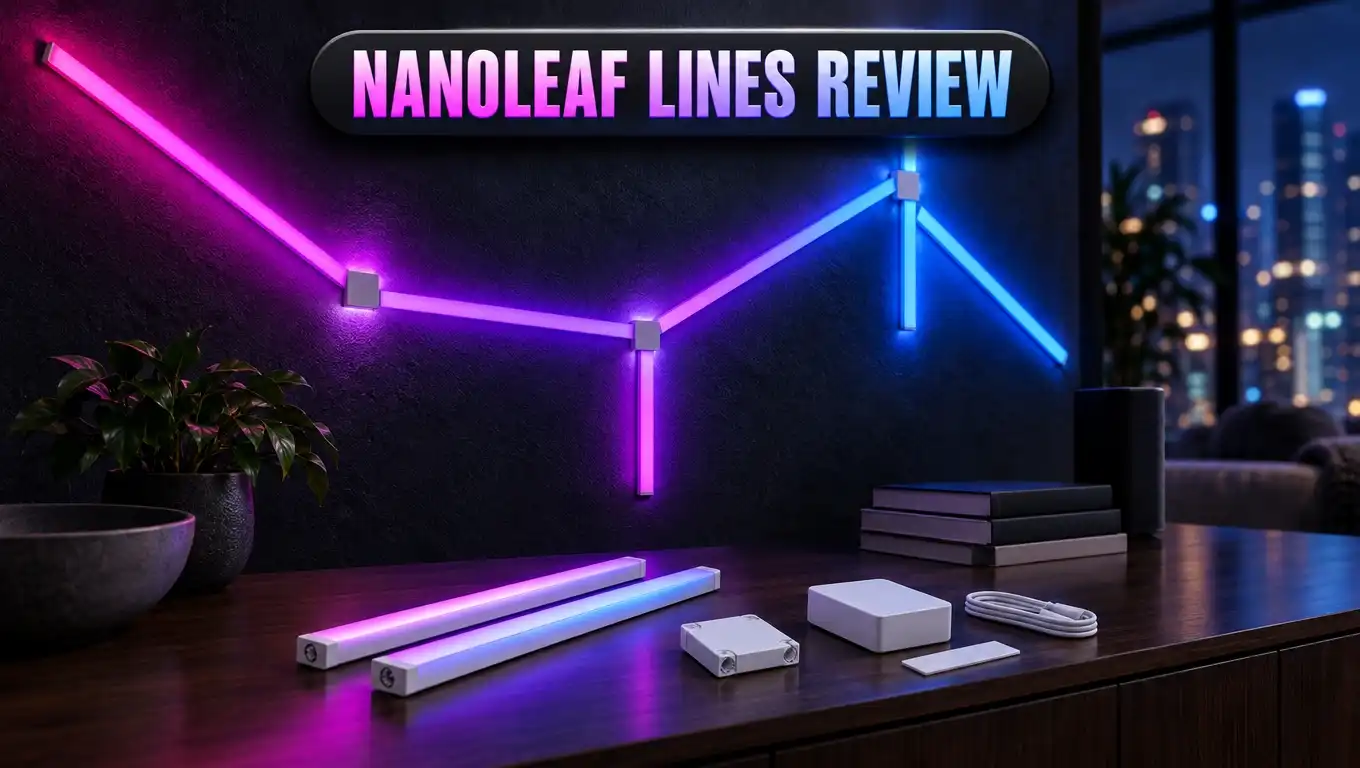
The Nanoleaf Lines are modular smart LED light bars. You connect them with small hexagon connectors to build shapes on your wall. Think triangles, diamonds, stars, or any pattern your imagination likes.
Each bar measures about 11 inches long with the connector ends. Only about 10 inches show once it is on the wall. The bars are light and slim, about 0.8 inches wide.
The LEDs sit on the back of each bar. So the light bounces off your wall. This gives you that dreamy backlit effect that made the Lines so popular.
Here are the key specs you should know:
- Colors: Over 16 million colors plus tunable white
- White range: 1200K warm to 6500K cool daylight
- Color zones: Two per bar
- Brightness: About 20 lumens per bar
- Connection: 2.4 GHz WiFi
- Extra role: Thread border router
The standard starter kit comes with nine bars. That is enough for a nice design behind a desk, TV, or bed. You can add expansion packs of three bars later.
Nanoleaf sells two styles. Lines 60 Degrees builds angled, geometric shapes. Lines 90 Degrees, also called Lines Squared, builds square layouts and wraps around corners. Both share the same glow and app features.
The kit also comes with a two year manufacturer warranty when bought from Nanoleaf. That gives you some peace of mind on a premium purchase.
Design and Build Quality
Older Nanoleaf panels had one big problem. When they were off, they looked like flat white plastic tiles on your wall. The Lines fix this nicely.
Slim bars look like modern wall art even when unlit. They feel minimal and clean. Many reviewers called the Lines the best looking Nanoleaf product yet for this reason.
Want more style? Nanoleaf sells optional skins that snap over the bars. They come in colors like matte black and pink. Skins make the Lines pop even during the day.
The connectors are small hexagon blocks. Each one sticks to the wall with double sided adhesive tape. A cap clicks on top with a satisfying snap. This hides the wiring and keeps everything tidy.
One connector acts as the controller. It has buttons on top. You can change scenes, adjust brightness, and turn on music mode without your phone.
The mounting bases also have screw holes. Nanoleaf suggests screws if you plan to mount the Lines on a ceiling. Gravity always wins over tape in the long run.
There is one weak spot in the design. The power adapter is chunky. A cable runs from the controller to a separate power module and then to the wall plug. It is the only part that does not look sleek.
Overall, the build feels light but solid. The plastic is good quality. The bars sit neatly in the connectors. You get a premium look without any heavy hardware on your wall.
Installation and Setup
Good news first. You do not need a drill. You do not need an electrician. Everything sticks on with tape.
But here is the honest truth. The setup takes patience and planning. The bars connect at fixed angles. If one connector sits slightly off, the whole design can twist out of shape.
Nanoleaf gives you a smart method. First, plan your design in the app with the Layout Assistant. Then build the full design on the floor. Finally, lift it and press it onto the wall in one go.
This works best with two people. One person holds the design. The other presses the connectors firmly. Solo installers can still do it by mounting one small section at a time.
Here is a simple setup flow:
- Plan your shape in the Nanoleaf app.
- Build the layout on a flat floor.
- Clean the wall so the tape sticks well.
- Mount the design carefully.
- Plug in the power supply.
- Scan the QR code on the power unit with the app.
The app connects over 2.4 GHz WiFi only. Most modern routers support this band, so it is rarely a problem. Some users need a couple of tries before the pairing works.
The whole job can take 30 to 60 minutes for a first timer. It goes faster once you understand the connectors.
One more tip: commit to your design. The tape is strong. Removing and remounting often can be tricky. Measure twice, stick once is the golden rule here.
Top 3 Alternatives for Nanoleaf Lines
The Nanoleaf Lines are great, but they are not the only choice. Here are three strong options worth a look before you buy.

- Customize Your Home Aesthetics: Design your hexagon light panels layout or choose from massive...
- Unique RGBIC: Each edge has different light colors to produce more effects like ultra-smooth flowing or...
- Visualize Your Songs: 6 kinds of Music Sync Modes make every lights panels dance to the rhythm. Turn your...
Last update on 2026-11-01 / Affiliate links / Images from Amazon Product Advertising API
The Govee Glide Hexa Light Panels are a popular budget pick. They use hexagon panels with RGBIC lighting. This means each panel can show several colors at once. They support music sync, Alexa, and Google Assistant. The Govee app is simple and full of scenes. They shine forward instead of backlighting the wall, so the look is bolder and more direct.

- Art by Design: Where modern meets futuristic, our game lights combine metal and plastic to create a...
- Free to Create: Transform your room with our DIY feature on Govee Home App. With 16.8 million color...
- Exquisite RGBIC: With Govee's RGBIC technology, each edge can show different light colors to produce...
Last update on 2026-11-01 / Affiliate links / Images from Amazon Product Advertising API
The Govee Glide Y Lights are the closest match to the Lines in style. They use slim light bars that connect into Y shapes. You can build stars, waves, and geometric patterns. They cost much less than the Nanoleaf Lines. The light faces outward, so you get punchy color rather than a soft halo. They are a smart choice for gamers on a budget.

- [Build & Expand Your Designs] Create beautiful symmetry in any room, or get completely abstract - the...
- [Color-Changing Animations] Customize your lights with colors and motions; transition colors slowly for...
- [16M+ RGBW Colors] Virtually limitless color options. Select from or create your own color-changing...
Last update on 2026-11-01 / Affiliate links / Images from Amazon Product Advertising API
The Nanoleaf Shapes Hexagons stay inside the Nanoleaf family. These panels glow from the front and support touch controls. You can tap a panel to change scenes or play simple games. The Lines do not offer touch at all. Shapes also mix with Triangles and Mini Triangles for creative designs. They use the same app and smart home support.
Which one should you choose? Pick Govee if price matters most. Pick Shapes if you want touch features. Stick with the Lines if you want the best backlit glow and a cleaner look when the lights are off.
App Experience and Control
The Nanoleaf app is your control center. It lets you pick scenes, adjust brightness, set schedules, and create your own effects.
The scene library is huge. Nanoleaf offers many built-in scenes, and the community shares thousands more. You can find calm sunsets, neon parties, forest greens, and everything in between.
Creating your own scene is fun. You pick colors, choose a motion style, and set the speed. Since each bar has two color zones, your custom scenes can look rich and layered.
Schedules work well. You can set the Lines to turn on at sunset or switch off at bedtime. Reviewers noted one small miss. The lights do not fade out slowly. They simply switch off.
Now the less fun part. Many reviewers say the app is not the most intuitive. New users may feel a bit lost at first. Menus can be confusing, and some settings hide in odd places.
The app may also pull in other smart lights from your home, like Philips Hue. Some people like this. Others find it cluttered.
Good news: you do not always need the app. The physical buttons on the controller let you cycle scenes and change brightness. Voice control works too. Just say “Hey Siri, turn on the Lines” or ask Alexa or Google to change colors.
Nanoleaf also offers a desktop app for PC features like Screen Mirror. Once you learn the layout, daily control becomes quick and easy.
Colors, Brightness, and Light Quality
This is where the Nanoleaf Lines truly shine. The colors are vivid, rich, and smooth.
The backlit design is the secret. Light hits your wall and spreads out softly. You never see harsh LED dots. Instead, you get a gentle glow that looks like it floats off the wall.
Each bar has two zones. So a single bar can fade from purple to blue. This adds depth and motion to every scene. Animated effects look mesmerizing in a dark room.
White light is impressive too. The range goes from a warm 1200K candle glow to a crisp 6500K daylight. One reviewer said the Daylight scene made a room look like sunshine through sheer curtains.
Now, let’s talk brightness honestly. Each bar puts out about 20 lumens. A nine bar kit gives about 180 lumens total. A standard LED bulb gives around 800 lumens or more.
So what does this mean for you?
- The Lines are perfect for ambient and mood lighting.
- They can work as a soft light in a small bedroom.
- They are not a replacement for your main ceiling light.
Bigger designs help. More bars mean more light. A 12 or 15 bar setup can feel bright enough for relaxing or reading in a small space.
Color accuracy is excellent. Reds look deep, blues look clean, and pastels look soft. For anyone who cares about beautiful light quality, the Lines are among the best in their class.
Music Sync, Screen Mirror, and Gaming
The Nanoleaf Lines are not just pretty. They are also interactive.
Music Sync uses a built-in microphone. It listens to sound in your room and makes the lights pulse with the beat. Scenes like Beat Drop and Cotton Candy turn your space into a mini dance club. It is a big hit at parties.
There is one catch. Some reviewers found that only certain rhythm scenes work with the Lines. Many community music scenes showed a message about a missing rhythm module. The default music scenes still work great, though.
Screen Mirror copies colors from your computer screen onto the Lines. Watch a movie or play a game, and your wall matches the action. This feature needs the Nanoleaf desktop app on a PC or Mac. It does not work directly with a smart TV.
Gamers get extra love. The Lines support Razer Chroma. This syncs your wall lights with your Razer keyboard, mouse, and headset. Supported games trigger lighting effects, like a red flash when you take damage.
Overwolf integration adds even more game-reactive effects for supported titles.
Here is why gamers love the Lines:
- They look stunning on stream behind a desk.
- The backlit glow does not cause screen glare.
- Effects match the action in real time.
One missing feature is touch control. Nanoleaf Shapes and Canvas react to touch, but the Lines do not. Most users do not miss it, since the bars are slim and sit flat against the wall.
Smart Home Support and Thread
The Nanoleaf Lines fit nicely into almost any smart home. They support Apple Home, Google Assistant, Amazon Alexa, SmartThings, and IFTTT.
This means you can control them with your voice. You can add them to routines. You can group them with other lights in your home. For example, a “Movie Night” routine can dim your main lights and turn the Lines purple.
Here is a hidden bonus many buyers miss. The Lines work as a Thread border router.
What does that mean in simple words? Thread is a fast, low power network for smart home devices. A border router connects those devices to your home network. Normally, you need a device like an Apple HomePod mini or a newer smart hub for this.
With the Lines, you get this feature for free. Nanoleaf Essentials bulbs and light strips respond much faster once the Lines are set up. Other Thread devices can benefit too.
Keep in mind one detail. The Lines themselves connect over 2.4 GHz WiFi, not Thread. They just act as the bridge for other Thread gear.
Why does this matter for you?
- Your smart home becomes more future ready.
- Thread devices react faster and more reliably.
- You may not need to buy a separate hub.
Smart home fans will find real value here. The Lines are not just decoration. They quietly make your whole setup smarter and quicker.
Lines 60 Degrees vs Lines 90 Degrees
Nanoleaf offers two versions of the Lines. Choosing the right one depends on your wall and your style.
Lines 60 Degrees is the original. The connectors join bars at 60 degree angles. This creates triangles, diamonds, hexagons, and star shapes. It is perfect for a bold, geometric, futuristic look.
Lines 90 Degrees, also called Lines Squared, uses right angle connectors. You can build squares, rectangles, and grid patterns. It also lets you wrap lights around corners of a room. This gives a cleaner, more architectural feel.
Here is a quick comparison:
- Best for gaming walls: Lines 60 Degrees
- Best for modern minimal rooms: Lines 90 Degrees
- Best for corners and ceilings: Lines 90 Degrees
- Best for wild creative shapes: Lines 60 Degrees
Both versions share the same core features. You get the same backlit glow, the same two color zones, the same app, and the same smart home support.
Prices are similar too. Both come in starter kits and expansion packs.
One important tip: do not mix them up when buying expansions. Make sure your expansion pack matches your starter kit type. Connectors are not designed to be swapped freely.
If you cannot decide, think about your room. A gaming or streaming setup usually looks amazing with 60 degree shapes. A living room or office often looks classier with squared lines. Either way, you end up with a beautiful glowing wall.
Price and Value
Let’s talk money. The Nanoleaf Lines are a premium product with a premium price.
The 9 bar starter kit lists at $199.99. The good news is that it often goes on sale. At the time of writing, Nanoleaf sells it for around $119.99. That is a big saving.
Expansion packs with three bars list at around $69.99. Optional skins cost extra. If you want a large design, the total can add up quickly.
So, is it good value? Here is how it stacks up:
- It costs about the same as the Nanoleaf Shapes starter kit.
- It is often cheaper than the Nanoleaf Elements kit.
- It costs more than Govee light bars and panels.
What do you get for the extra money compared to Govee? You get a softer backlit glow, a cleaner look when off, Apple Home support, and the Thread border router feature. Those extras matter to many buyers.
Value also depends on how you use them. If the Lines sit behind your desk every day, the cost per use drops fast. If you want a cheap party light, a budget brand may serve you better.
My advice is simple. Wait for a sale if you can. Nanoleaf runs deals often, especially around holidays. At the sale price, the Lines feel like a very fair deal for the quality you get.
Pros and Cons
Here is a clear look at the good and the not so good.
Pros
- Gorgeous backlit glow. The light spreads softly on your wall with no harsh LED dots.
- Two color zones per bar. Each bar can show two colors, which makes scenes rich and lively.
- Looks good when off. Slim bars look like modern art, unlike older flat panels.
- Wide smart home support. Works with Apple Home, Alexa, Google Assistant, SmartThings, and IFTTT.
- Thread border router built in. Other Thread devices respond faster after setup.
- Great gaming features. Razer Chroma, Overwolf, and Screen Mirror add real fun.
- No drilling needed. Adhesive tape mounting keeps installation simple and renter friendly.
- Expandable design. You can add more bars later to grow your layout.
Cons
- Pricey at full price. The starter kit costs more than most rivals unless on sale.
- Setup needs care. Fixed angles mean small mistakes can twist the whole design.
- Low brightness. About 20 lumens per bar makes them mood lights, not room lights.
- App can confuse. New users may find the menus hard to learn.
- No touch controls. Unlike Shapes and Canvas, you cannot tap the Lines.
- Bulky power adapter. The plug and power module break the sleek look.
- 2.4 GHz WiFi only. Some routers need tweaks before the Lines connect.
Overall, the pros clearly win for most buyers. The cons are real, but most are small annoyances rather than deal breakers.
Who Should Buy Nanoleaf Lines
The Nanoleaf Lines are not for everyone. But for the right person, they are a perfect fit.
Gamers and streamers should be first in line. The Lines look stunning on camera. Razer Chroma sync adds live effects. The backlit glow also keeps glare off your monitor.
Smart home fans will love the Thread router feature. If you use Apple Home, the Lines fit right in. They make your other Thread devices faster and more reliable.
Design lovers will enjoy the clean look. Even when off, the Lines look like wall art. Add skins, and they become a real style statement.
Music lovers and party hosts get a fun bonus. Music Sync turns any gathering into a glowing dance floor.
Now, who should skip them?
- Budget buyers may prefer Govee options that cost much less.
- People who need bright light should look at regular smart bulbs instead.
- Renters who move often might struggle, since remounting the tape is tricky.
- Touch fans will be happier with Nanoleaf Shapes.
Here is my final verdict. The Nanoleaf Lines deliver some of the most beautiful ambient lighting you can put on a wall. The setup takes care, and the price is high at full cost. But the glow, the smart features, and the clean design make them worth it, especially on sale.
If you want your room to feel special every single night, the Nanoleaf Lines are an easy recommendation.
Frequently Asked Questions
Are Nanoleaf Lines bright enough to light a room?
Not fully. Each bar gives about 20 lumens. A nine bar kit gives around 180 lumens. They work best as mood lighting or a soft light in a small bedroom.
Do Nanoleaf Lines damage walls?
They use adhesive tape, so no drilling is needed. Each connector has a pull tab for removal. Still, some paint may peel on certain walls, so test carefully.
Do Nanoleaf Lines work with Apple HomeKit?
Yes. They work with Apple Home, Google Assistant, Amazon Alexa, SmartThings, and IFTTT. You can control them with Siri, Alexa, or Google voice commands.
Can I mount Nanoleaf Lines on the ceiling?
Yes. Nanoleaf suggests using screws for ceiling mounts. Each connector base has screw holes for this purpose.
Do Nanoleaf Lines need 5 GHz WiFi?
No. They connect over 2.4 GHz WiFi only. Most dual band routers support this band without any problem.
Can I add more bars later?
Yes. You can buy expansion packs of three bars. Just make sure the pack matches your kit type, either 60 degrees or 90 degrees.
Are Nanoleaf Lines touch sensitive?
No. The Lines do not support touch. If you want touch controls, look at Nanoleaf Shapes instead.
Does Screen Mirror work with a TV?
Screen Mirror needs the Nanoleaf desktop app on a computer. It works when you watch or play content from that computer, not directly from a smart TV.

DK is the founder and lead writer at Smart Lighting Finds, where he helps readers discover the best lighting products through honest, hands-on reviews and in-depth comparisons. With a deep passion for home improvement and smart technology, DK is dedicated to making every lighting decision easier and brighter for his readers.